
What Replaces Manual AI Mention Tracking? An Enterprise Workflow
Automated AI mention tracking replaces manual checks with prompt sampling, evidence storage, dashboards, alerts, and governed migration.

Manual checking looks manageable until the team needs comparable evidence across multiple engines, markets, and weeks. For example, OpenAI documents a 30-day default application-state retention period for its Responses API, which is a useful reminder that an evidence history needs an intentional storage plan.
Automated AI mention tracking replaces repeated manual searches with a versioned prompt set run across selected answer engines on a schedule. Each response is stored with its engine, model or mode, date, location and language configuration, brand mentions, recommendation context, sentiment labels, and cited URLs. Teams then review trends alongside the underlying answers instead of treating one generated response as a stable ranking.
This workflow explains how to move from repetitive checks to prompt sampling, raw-answer evidence, useful metrics, dashboards, alerts, and a controlled migration from an existing spreadsheet.
Why Do Manual AI Mention Checks Break Down?
A manual check is a useful baseline, but it becomes unreliable once several people run prompts at different times and record only a summary. The task is not simply to find a brand name. It is to recreate the conditions under which an answer appeared, then compare that evidence with later answers.
Personalization, location, search settings, conversation context, and model behavior can all shape results. ChatGPT can use Memory and general location when it reformulates certain searches, according to its search documentation. That means an unrecorded setting can turn a supposed trend into an apples-to-oranges comparison.
The labor compounds quickly. A team spending 15 hours each week on copying prompts, switching engines, saving screenshots, and updating rows would spend 780 hours over a year before considering analysis or action. More importantly, one answer cannot prove a stable position. It is a sampled observation, not a search ranking.
| Dimension | Manual Checking | Automated Monitoring Workflow |
|---|---|---|
| Labor | Repeated searching, copying, and interpretation | Scheduled collection, with people focused on exceptions |
| Repeatability | Prompts and settings can drift | Prompt versions and run settings are retained |
| Evidence Retention | Often limited to notes or screenshots | Raw answer, sources, parsed fields, and timestamps stay linked |
| Engine Coverage | Requires switching between interfaces | Uses configured engine-specific collection paths |
| Alerting | Depends on someone remembering to check | Routes material changes to a defined owner |
| Governance | Spreadsheet permissions and notes vary | Retention, access, review, and audit rules are defined |
We treat manual work as a baseline to preserve, not an operating model to scale. For a closer look at the shift from conventional measurement, see our AI visibility comparison.
How Do Teams Build a Representative Prompt Set?
A representative prompt set reflects how buyers ask for help, not merely the terms a company hopes to own. It should be fixed enough to support comparison and broad enough to reveal whether a brand appears during category discovery, problem solving, evaluation, and direct brand research.
Start with Four Prompt Families
Build the core set from four question types:
- Category prompts: Questions asking for the best, leading, or suitable options in a category.
- Problem prompts: Questions describing the operational problem a buyer wants to solve.
- Comparison prompts: Questions weighing approaches, alternatives, or named choices.
- Branded prompts: Questions about implementation, pricing, suitability, reviews, or common misconceptions.
Each prompt needs an ID, exact wording, intent family, business priority, owner, language, and approved geography. That structure lets a team distinguish a change in visibility from a change in what it chose to test.
Preserve the Baseline Before Expanding It
The spreadsheet a team has used for six months is valuable historical context, even if its fields are incomplete. Keep it as prompt version zero. Map each historic row to a prompt ID where possible, mark missing configuration details as unknown, and do not retroactively fill gaps with assumptions.
New prompts should enter through a change log. Record why they were added, which family they join, when they become reportable, and whether they belong to the fixed benchmark set or an exploratory queue. A consistent change process prevents a growing prompt library from quietly changing what the team claims to measure.
Sample More Carefully, Not Just More Often
There is no universal number of prompts or runs that makes every category statistically settled. Start with a representative fixed set, measure variation by engine and prompt family, then increase samples for the questions where leadership decisions depend on the result.
A useful reporting rule is simple: label every result as a sample of configured prompt runs. It is not a census of every question users asked an AI system, and it should never be presented as one. Our buyer prompt dataset framework can help teams formalize and maintain that library.
How Does Automated AI Mention Tracking Create an Auditable Record?
The useful replacement for manual monitoring is a collection architecture. It takes a stable input, captures the answer under documented conditions, preserves the raw evidence, then derives metrics without throwing away the source material.
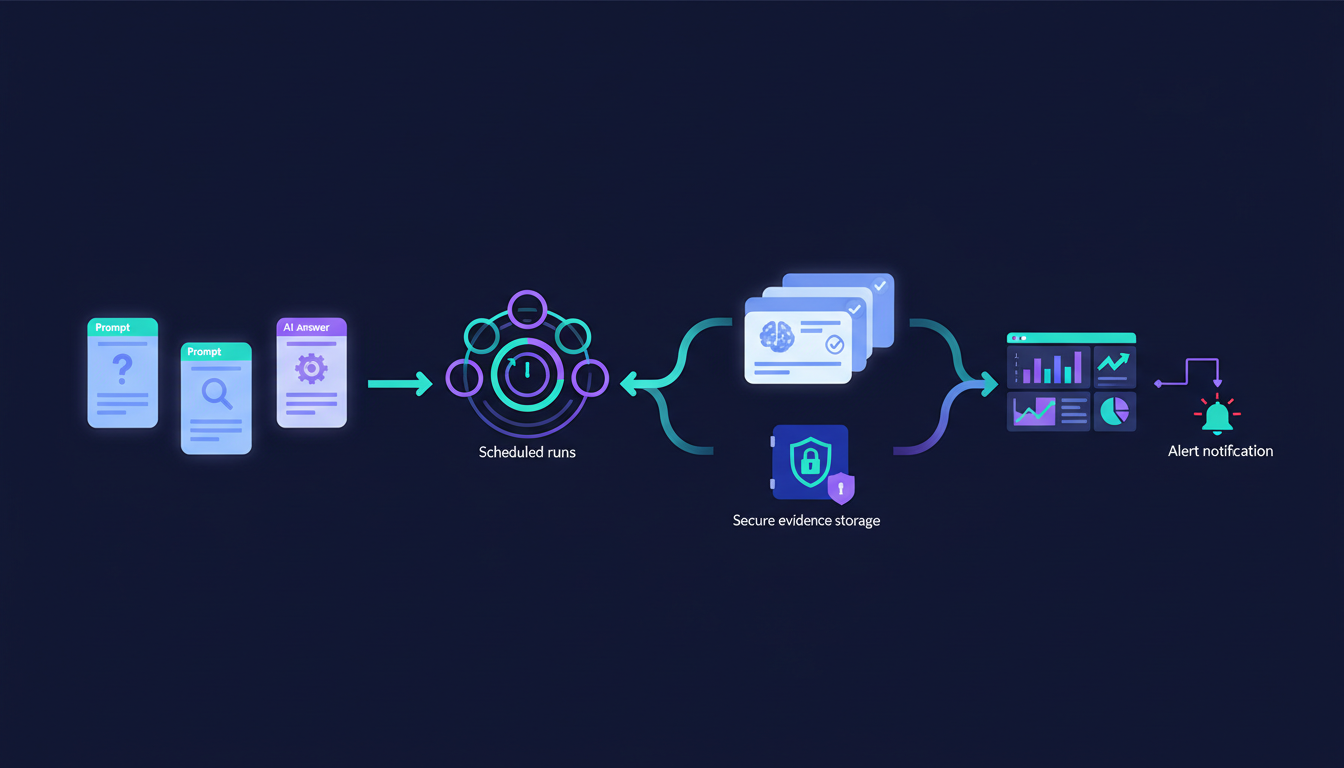
Run a Defined Collection Pipeline
Versioned Prompt Library
          ↓
Scheduler And Run Queue
          ↓
Configured Engine Collection
          ↓
Raw Answer And Source Capture
          ↓
Extraction And Human QA
          ↓
Evidence Store And Metric Tables
          ↓
Dashboards, Alerts, And Investigation
The scheduler should record when a test was requested and completed. The collector should retain engine, model or mode, search state, geography, language, and method. If the same prompt runs against ChatGPT, Perplexity, or Claude, those are separate observations, not interchangeable rows.
Where an official API is available, it may return structured response data. Perplexity’s current API examples include output text, model information, timestamps, usage fields, and citation annotations in structured output. Browser collection can still be necessary for certain experiences, but it needs stronger evidence capture because interface behavior can change.
Store the Raw Answer Before Parsing It
An extracted metric is an interpretation. The raw answer is the evidence that allows someone to verify or challenge that interpretation later.
run_id | prompt_id | prompt_version | exact_prompt
engine | model_or_mode | search_state | country | language
started_at_utc | completed_at_utc | collector_version
raw_answer | answer_hash | payload_or_rendered_evidence
brand_aliases_found | recommendation_label | sentiment_label
explicit_list_position_or_unranked | tracked_brands_found
citation_display_order | citation_url | citation_domain | owned_domain_flag
parser_version | QA_status | reviewer | retention_class
Store the full response separately from the parsed record. A later parser upgrade may recognize a new brand alias or improve citation detection, but it should not overwrite the original answer. Our cross-engine answer guide covers the evidence layers that make this possible.
Automate Repetition, Review Ambiguity
Automation is effective for scheduling, text matching, URL extraction, source classification, duplicate detection, and change detection. Humans should review ambiguous aliases, recommendation phrasing, material sentiment changes, and high-priority alerts.
This division keeps the system fast without pretending that every sentence can be classified perfectly. It also gives content and brand teams a defensible record when they need to investigate why an answer changed.
Which Metrics Should Teams Track Separately?
A dashboard becomes misleading when it collapses several different signals into one score. A brand can be named without being recommended, recommended without receiving an owned citation, or cited without appearing in the answer body. Those are different outcomes that require different actions.
ChatGPT search can show inline citations or a Sources panel, while citation behavior differs by product and configuration. Its source controls are one reason to track citation availability separately from brand visibility.
| Metric | Definition | Useful Denominator | Interpretation Rule |
|---|---|---|---|
| Mention Rate | Responses containing the canonical brand or approved alias | Eligible answer records | Indicates presence, not endorsement |
| Recommendation Rate | Responses explicitly proposing or endorsing the brand | Eligible answer records | Requires a documented classification rule |
| Owned Citation Rate | Responses exposing a citation to an owned URL | Records where citations were available | Never replace unavailable data with zero |
| Sentiment | Exact language used to frame the brand | Reviewed brand mentions | Retain the supporting excerpt |
| Position | Explicit ordinal placement in an ordered answer list | Ordered-list responses only | Use unranked for unstructured answers |
| Share Of Voice | A brand’s counted appearances among tracked brands | Defined engine, prompt set, and period | Display the denominator with the score |
A mention is a name appearing in the answer. A recommendation is language that presents the brand as a suitable choice for a defined need. A citation is a visible or structured source reference that points to a page. Sentiment describes how the answer frames the brand. Position only applies when the answer truly supplies an ordered list.
That distinction matters when a content team asks, “Did we earn a source link?” and an executive asks, “Are we appearing more often?” The same answer record can support both questions, but the metric cannot answer them interchangeably. A defined prompt taxonomy also helps anchor these classifications in buyer intent, as explained in our B2B prompt research.
How Should Results Be Normalized and Reported?
Normalization should make comparable observations easier to analyze, not erase the differences that caused them. Standardize the fields that describe a run, then segment the results by the settings that materially change the answer experience.
Normalize prompt ID and version, engine, model or mode, collection method, UTC timestamp, country, language, prompt family, brand alias rules, and parser version. Keep the original display values as well. When a model, search state, or market changes, flag the break in the trend rather than blending the data into a smooth but misleading chart.
Perplexity documents country and language controls in its search endpoint, which illustrates why locale cannot be treated as a cosmetic reporting filter. A result collected for one market may be a valid observation, but it is not automatically comparable to another.
Dashboard design should follow the audience:
- Marketing leaders: Mention and recommendation trends by engine, market, and prompt family.
- Content teams: Missing-answer opportunities, owned citations, source domains, and exact language requiring a response.
- Executives: High-priority coverage, material changes, trend direction, and confidence notes.
- Competitive-intelligence teams: New entities, lost recommendations, and before-and-after evidence records.
Every alert should link to the actual answer records that triggered it. Alert on a lost recommendation for a high-priority prompt, a newly negative claim, a new tracked brand entering a cluster, or a material citation change under stable conditions. Define the alert owner, severity, and review deadline before notifications begin. This keeps normal response variation from becoming an endless stream of uninvestigated messages. For exact-language review, use our sentiment analysis guide.
How Do Teams Migrate from a Manual Spreadsheet?
Migration succeeds when the team preserves what it knows, labels what it does not know, and validates the new workflow in parallel before replacing the old one. The aim is not to prove that every historic row was perfect. It is to create a trustworthy baseline and a cleaner series going forward.

Choose Build or Platform Software Deliberately
| Decision Factor | Build With Browser Automation Or APIs | Use Platform Software |
|---|---|---|
| Browser Automation | Team owns session behavior and interface maintenance | Provider maintains supported collection paths |
| APIs | Direct control where official access exists | Provider abstracts supported integrations |
| Governance | Team designs access, retention, audit logs, and approval flows | Team evaluates permissions, exports, retention, and controls |
| Maintenance | Requires engineering capacity for adapters and changes | Requires vendor diligence and operating ownership |
| Evidence Design | Fully customizable | Confirm raw-answer access and record-level drill-through |
A build can be appropriate when a team has engineering capacity, unusual evidence requirements, and governance patterns it must own. Platform software can be appropriate when the higher cost of maintenance, configuration drift, and collection support outweighs the value of custom implementation. Neither choice removes the need for clear prompt, metric, and evidence rules.
Follow an Eight-Step Migration Checklist
- Export and freeze the manual spreadsheet baseline.
- Deduplicate prompts and assign IDs, families, priorities, owners, and versions.
- Define approved aliases, owned domains, tracked brands, and metric rules.
- Choose engine, model or mode, geography, language, and run schedule.
- Map the raw-answer record and set retention and access rules.
- Run manual and automated collection in parallel for one reporting cycle.
- Reconcile meaningful mismatches against stored evidence, then refine parsers rather than history.
- Publish the baseline, activate alerts, and review taxonomy changes monthly.
Governance belongs in the initial build, not an afterthought. OWASP recommends structured server-side logging for operations and security monitoring, while avoiding secrets and sensitive prompt content in broadly accessible logs, in its LLM standard. For a focused framework covering engine-level analysis, see our multi-engine signals. Our deployment checklist helps teams turn that principle into a launch plan.
Why PageLens.ai for Automated AI Mention Tracking?
At PageLens.ai, we built our monitoring workflow for teams that need evidence before they make a content, brand, or budget decision. We turn approved buyer prompts into scheduled cross-engine runs, retain the exact response and source context, and make each dashboard movement traceable to its underlying records. That gives marketing leaders a way to brief executives without turning a volatile answer into a false ranking. It also gives content and competitive-intelligence teams a shared queue for investigating lost recommendations, new citations, or changing language. Start with the prompt set you already have, preserve its baseline, then decide which engines, markets, and alert thresholds deserve ongoing coverage. We can help you design that transition around your reporting cadence and governance requirements, rather than force your team into a generic score with a repeatable system when you are ready to replace manual work. Book a demo
FAQs on Automated AI Mention Tracking
Is Automated AI Mention Tracking Just Keyword Monitoring?
No. It tracks keywords within a controlled experiment, preserving the prompt, engine configuration, raw response, citations, and denominator needed to compare results over time reliably.
How Often Should We Run AI Visibility Checks?
Run high-priority branded and purchase-intent prompts more frequently, then review aggregate trends on a regular reporting cadence. Set frequency according to variation, budget, risk, and investigation capacity.
Can We Compare Results Across ChatGPT and Perplexity?
Yes, when every record retains engine-specific settings and results are reported separately first. Combine them only in clearly labeled summaries, never as directly comparable ranking data.
Why Store Raw AI Answers Instead of Only Scores?
Raw answers let teams verify classifications, investigate alerts, inspect citations, and reprocess history when taxonomies improve. Scores without evidence cannot explain what changed or why.