.png)
Best ChatGPT Trackers for Multi-Client Teams
Compare ChatGPT trackers for multi-client teams, including workspace isolation, reporting, governance, and eight-client costs.

Best ChatGPT Trackers for Multi-Client Teams
When an agency uses an API in its workflow, OpenAI policy says inputs and outputs may be retained for up to 30 days, which makes client-level access, exports, and retention decisions part of tracking operations.
For an agency managing multiple sites, the best ChatGPT tracker is one that creates a separate operating space for each client, then rolls up performance without mixing prompts, competitors, evidence, or permissions. It should automate scheduled runs and reports, preserve answer history, expose citations, and make every added site, engine, seat, and export cost clear.
This comparison ranks the operating models that matter, shows how we evaluate PageLens.ai, calculates an eight-client baseline, and provides a reusable workflow for agency reporting.
How Do We Rank ChatGPT Trackers for Multi-Client Teams?
We do not treat a tracker as an answer engine leaderboard with a prettier dashboard. We rank it by whether an agency can launch, operate, govern, and report on several clients without turning every new account into a custom research project. The NIST profile, published in 2024, reinforces the need to treat generative AI measurement as a governed system, not an unaccountable output.
That puts client separation ahead of superficial breadth. A tool that supports more engines but exposes one client’s prompt library or cited-source history to another is not ready for a serious portfolio. Likewise, a low entry price is not a useful comparison if it excludes reporting, seats, exports, or the prompt volume required to establish a reliable baseline.
| Rank | Tracking Model | Best Fit | Main Watchout |
|---|---|---|---|
| 1 | PageLens.ai portfolio workflow | Eight-client SEO teams that need daily evidence and reporting | Confirm commercial terms for Agency access |
| 2 | Per-site monitoring plan | Freelancers proving demand with one or two clients | Costs can multiply by site and engine |
| 3 | Broader SEO suite add-on | Teams that want AI visibility beside existing SEO reports | Prompt-level evidence may be less central |
| 4 | Custom enterprise monitoring | Large agencies with procurement and governance needs | Setup, contracts, and reporting can be heavier |
Our scorecard weights workspace isolation at 20%, reusable prompt deployment at 15%, competitor and citation evidence at 12%, then engine control, refresh history, reporting, permissions, export access, governance, and normalized eight-client cost. That distinction matters because AI visibility versus SEO is not simply another rank-tracking column.
What Makes a Client Workspace Separate?
Multiple domains in one account are useful, but they do not automatically create separate client workspaces. A genuine workspace keeps each client’s prompts, competitors, evidence, report settings, users, and historical runs distinct. The agency can still see a portfolio roll-up, but an account manager cannot accidentally export Client A’s cited sources into Client B’s report.
This is the practical line between a tool that can hold several domains and a system that can support a client service. Client isolation protects confidentiality, prevents prompt libraries from drifting across accounts, and keeps ownership clear when a retainer ends.
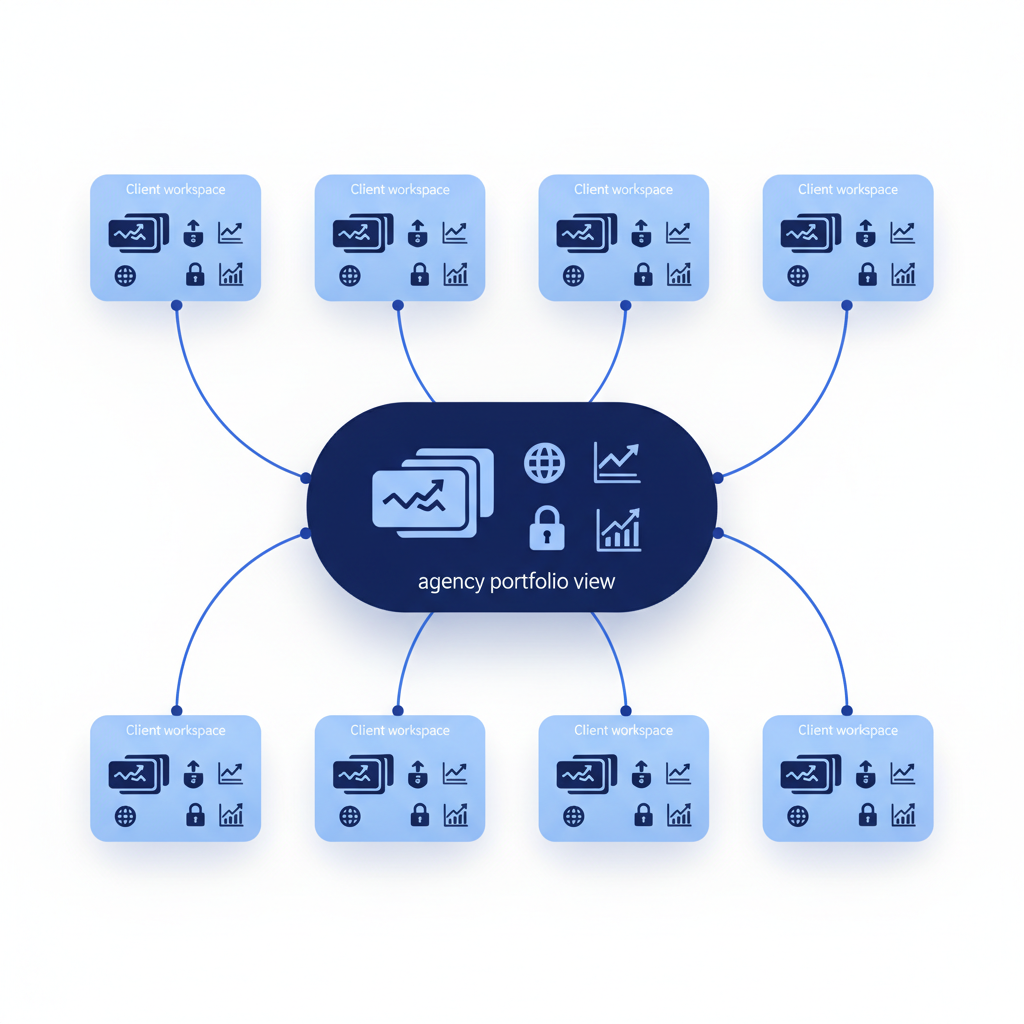
A defensible workspace should include:
- Prompt separation: Each client has its own approved prompt groups, locations, languages, and engine settings.
- Competitor separation: The competitor set belongs to the client, rather than becoming a global list that can contaminate another account.
- Evidence separation: Exact answers, citations, sentiment labels, and source history remain attributable to the correct client and run date.
- Permission separation: Client-facing users see only their workspace, while agency leaders can view portfolio-level progress.
- Offboarding separation: The agency can export agreed evidence, remove access, and apply the contract’s retention policy.
For larger teams, our deployment checklist is a useful way to turn those requirements into procurement questions before data enters the tracker.
Which Tracking Model Fits Your Team?
The right choice depends less on your total number of websites than on the repeatability of your service. A freelancer can begin with one focused baseline and a simple report. An eight-client SEO team needs templates, scheduled collection, and proof that client data stays separate. A larger agency needs those foundations plus governance controls that survive staff changes.
PageLens.ai Portfolio Workflow
Agency Strengths: We track daily visibility across the answer engines your buyers use, preserve the evidence behind a result, and help teams work from mentions, citations, share of voice, sentiment, and cited sources rather than isolated screenshots.
Limits: We recommend confirming Agency access details, including seats, export format, API requirements, retention, and offboarding expectations during the buying process.
Verified Pricing: Our public plans list Monitor at $49 per month for one site, 50 prompts, daily ChatGPT tracking. Optimize is $199 per month for one site, 100 prompts, daily tracking across three listed answer engines, plus competitor and sentiment tracking. See our pricing for current plan details.
Best Fit: Eight-client teams that need a repeatable reporting workflow and a portfolio view without losing client-level evidence.
Per-Site Monitoring Plan
Agency Strengths: This model can be sensible when an agency is validating demand or handling a very small roster. It keeps the initial commitment lower and makes a focused client pilot easier to explain.
Limits: Check whether every client requires a separate paid site, additional prompts, extra engines, report exports, or extra user seats. A cheap single-site plan is rarely a portfolio price.
Pricing: Use the published plan allowance, not a headline starting price, to calculate the cost of the client workload.
Best Fit: Freelancers and early-stage teams that need proof before standardizing a new service.
Broader SEO Suite Add-On
Agency Strengths: An add-on can make sense when the team already manages traditional SEO reporting in one place and wants a supplemental view of AI answer visibility.
Limits: Ask whether the tool stores exact answers, citations, competitor context, and dated prompt history at the client level. A summary metric without evidence is difficult to defend in a client review.
Pricing: Include the base SEO subscription, the AI feature, user access, and additional domains in the total.
Best Fit: Established SEO teams that value consolidated reporting and already have a mature client-access process.
Custom Enterprise Monitoring
Agency Strengths: A custom implementation can support broad governance requirements, specialized reporting, and larger prompt programs.
Limits: It may take more procurement, setup, and process design than an eight-client team needs. More capability does not replace clear workspace rules.
Pricing: Treat custom pricing as a request for a workload model, not a blank cheque. Ask for written inclusions and overage definitions.
Best Fit: Larger agencies that need formal access controls, tailored contracts, and a documented client-data lifecycle.
The common denominator is reproducible evidence. Our citation tracking guide explains why a report should retain the answer and source context behind every claimed change.
What Does Eight-Client Tracking Really Cost?
A normalized comparison starts with the work, not the monthly headline. For a reasonable agency baseline, assume eight client sites, 50 or 100 prompts per client, one or more answer engines, three competitors per client, two internal users, and daily collection. Those assumptions show whether a plan supports the service you actually intend to deliver.
Our public single-site prices make the math transparent. They do not imply that single-site plans provide the same client-workspace, reporting, or permission features as Agency access. That distinction is why we recommend discussing the portfolio workflow before deciding which plan is economical.
| Scenario | Assumed Workload | Monthly Calculation | Monthly Cost |
|---|---|---|---|
| Focused ChatGPT baseline | 8 sites, 50 prompts each, daily ChatGPT tracking | 8 × $49 | $392 |
| Core multi-engine baseline | 8 sites, 100 prompts each, daily tracking across three listed engines | 8 × $199 | $1,592 |
| Full listed-engine baseline | 8 sites, 100 prompts each, daily tracking across all listed engines | 8 × $599 | $4,792 |
| Agency workflow | 8 sites with selected prompts, engines, and reporting | Custom commercial terms | Request a quote |
The useful number is the fully loaded monthly cost: sites, prompts, engines, competitors, seats, reports, exports, and any onboarding work. Review agency pricing models before comparing plans, especially when a provider advertises an attractive entry tier but charges separately for the functions an agency needs.
How Should an Agency Launch, Report, and Govern Eight Clients?
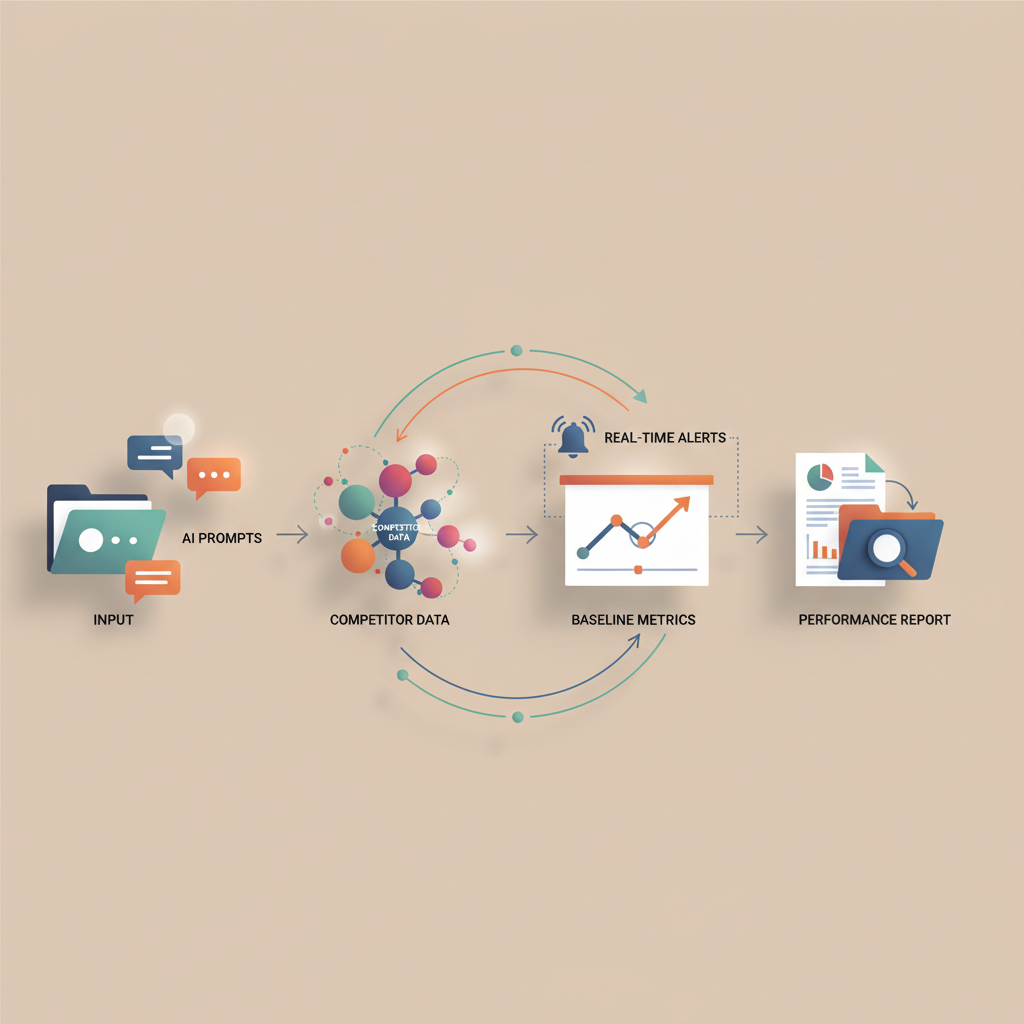
The first month should create an evidence baseline, not a promise of instant improvement. We recommend launching the same seven-step workflow for each client, then allowing only deliberate differences in prompt sets, competitors, buyer geographies, and report audiences. That discipline lets an agency compare client movement without pretending that every market behaves the same way.
Build Prompt Templates Before You Run Them
Start with 25 to 50 decision-stage prompts per client. Group them into category, use-case, comparison, alternative, implementation, pricing, and trust themes. Then customize only the parts that reflect that client’s real buyer language, which is where buyer prompt research becomes more useful than copying a generic keyword list.
Follow a Seven-Step Onboarding Sequence
- Create a client workspace and appoint an accountable owner.
- Add the approved prompt template and document client-specific changes.
- Add the client’s agreed competitor set.
- Choose answer engines and the refresh schedule.
- Run and archive the baseline before making visibility changes.
- Set alerts for mention, citation, sentiment, and competitor-share movement.
- Schedule a report with evidence, actions, owners, and a next review date.
Report Portfolio Metrics and Client Metrics Differently
At portfolio level, track which clients moved, which reports are due, where alerts need review, and how much prompt-engine coverage is active. Do not merge client competitors or sources into one vanity score.
At client level, report mention rate, citation rate, share of voice, sentiment, cited sources, source overlap, exact answers, and the action assigned to the observed gap. Our sentiment analysis guide helps teams preserve the model’s exact language rather than reducing every narrative change to a positive or negative label.
Review Access and Retention Every Quarter
Reconfirm client owners, remove departed users, review exports, and decide what should happen to archived answers when a contract changes. Automation is valuable when it reduces manual checking, but it still needs a named owner.
Why Does PageLens.ai Fit Multi-Client Reporting?
PageLens.ai is built for teams that need a repeatable answer to a client’s next visibility question, not another screenshot to defend. We help you organize monitored sites, buyer prompts, evidence, cited sources, sentiment, and competitors into a reporting rhythm that account managers can run without rebuilding it for every brand.
Start with one workspace, preserve a dated baseline, then show the client what changed, what prompted the change, and what we will test next. Our daily tracking supports the evidence trail behind that conversation. When a portfolio needs more than a score, we make it easier to move from an answer to its source and from a gap to a content decision. If you are starting with a single property, our single-site option explains the leaner path. For a multi-client walkthrough with our founders and a plan for your next steps, Book a demo.
FAQs on ChatGPT Trackers for Multi-Client Teams
Is Multi-Domain Tracking the Same as Separate Client Workspaces?
No. Multiple-domain access can put several sites in one account, while separate workspaces isolate each client’s prompts, competitors, evidence, users, reports, and history by default.
How Many Prompts Should an Eight-Client Team Start With?
Start with 25 to 50 decision-stage prompts per client, group them by intent, establish a baseline, then expand only after the reporting workflow is stable.
Can an Agency Automate ChatGPT Visibility Reporting?
Yes. Schedule recurring collections, alert on material changes, archive exact answers and cited sources, then deliver branded reports with actions, owners, deadlines, and review dates.
What Is the Best Starting Point for One Website?
For one website, begin with focused prompts, daily evidence collection, and a reporting cadence. Add engines and portfolio controls only after client demand makes them.